The WFA website utilizes dynamic content and a rather unconventional means of listing email addresses. Let's take a look at how the website works (for Windows Users).
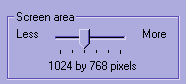
Your browser and screen resolution settings: This website was created to work best in the 1024x768 resolution. In 800x600, you would have to scroll more and most websites won't look as good. To change your screen resolution, first locate the start button and click on the little blotter icon, this will bring you to your desktop. (If you're using Windows 2000, if not just skip this part and go on to the next step)

Next, right click anywhere on the desktop, a menu will pop up. Click on "Properties".
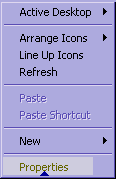
The display properties menu opens, choose the "Settings" tab, then look directly beneath it. There is a screen area, move the arrow until it reads 1024x768.
 |
 |
You may also want to maximize your browser window to get the most out of this page.
Regarding Email on this Site
Limiting the amount of unwanted email (Spam) is a priority for everyone lately. To help keep the junk mail in our inboxes down, the links to send us emails look something like this when clicked on.
name(at)serviceprovider.com
To properly email us, simply change the (at) to @ and proceed as usual. It should look like this: name@serviceprovider.com - that's all there is to it!
Regarding accessing content
There are two small blue arrows,
and
at the bottom of each page, simply hover your mouse over them to make the information move up or down.